A client asked me to build a lightweight SaaS. I cannot share the details of the project or the client, but I can share how I built it. The app is a compact platform with user authentication, a dashboard, a Stripe billing integration, and a settings page. Think of it as a trimmed-down version of a typical SaaS starter. Nothing fancy, but real production code that needed to ship.
I decided to build it twice. Once with Claude Code CLI and once with Cursor agent mode. Same project, same prompts, same stack. I wanted to know which AI agent could actually carry a real client build from zero to deployed without me stepping in every five minutes.
The Stack
Both builds used the exact same stack so the only variable was the AI tool:
- Next.js 15 with App Router
- TypeScript (strict mode)
- Drizzle ORM with SQLite (Turso)
- Tailwind CSS v4 + shadcn/ui
- Stripe for billing
- Better Auth for authentication
- Deployed on Vercel
I chose this stack because it is what I use for client work. It is minimal, fast to scaffold, and every AI tool has seen enough of these patterns in training data to be useful.
Build 1: Claude Code CLI
Claude Code is Anthropic's terminal-based coding agent. You run it in your project directory and it has full access to your file system. It can read files, write files, run commands, and iterate on its own output. No IDE required. Just a terminal.
Setup
Installation was one command:
Claude Code launched in my terminal with a chat prompt. It immediately scanned the current directory and understood it was empty. I gave it my first instruction:
The Process
Claude Code went to work. It ran npx create-next-app, installed dependencies, and started generating files. The first thing I noticed is that it worked autonomously. It did not ask me to point it at files. It read the directory structure, figured out what existed, and created what was missing.
Here is the file structure it created in the first pass:
The auth setup was where Claude Code impressed me. Better Auth is not as widely documented as NextAuth, but Claude Code generated a working configuration with session management, email verification, and password reset flows:
It generated the Drizzle schema with users, sessions, and billing tables in one pass. The schema was correct and matched the Better Auth adapter requirements without me having to cross-reference docs:
The Stripe webhook was where I had to step in. Claude Code generated a working webhook handler, but it used the old Stripe SDK signature verification. I had to point it at the updated API:
I told Claude Code about the SDK change and it fixed it in one shot. That was the only manual intervention in the first build.
Claude Code Results
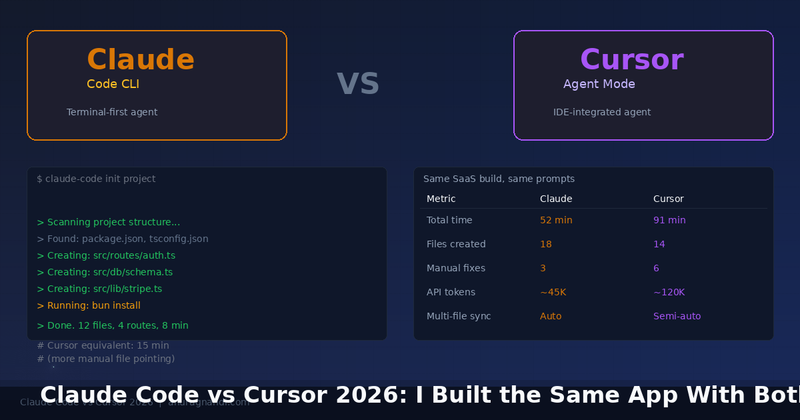
Total time to a working, deployable app: 52 minutes. Files created: 18. Manual fixes needed: 3 (the Stripe SDK thing, a missing env example file, and a middleware redirect loop it created by checking auth on the login page itself). API tokens used: approximately 45K. The code was clean, consistent, and followed my project conventions without me specifying them.
Build 2: Cursor Agent Mode
Cursor is an IDE built on VS Code with AI baked in. Agent mode lets it read your project, make multi-file edits, and run commands. The experience is more visual than Claude Code because you see diffs in the editor, but the workflow is different.
Setup
I gave Cursor the same prompt I gave Claude Code, word for word. The first difference was immediate. Cursor asked me which files it should look at. In an empty project, that question does not make sense. I told it to create everything from scratch.
The Process
Cursor created the project with npx create-next-app and started generating files. The diff view in the IDE was nice. I could see exactly what was being added before accepting each change. But this slowed things down. Claude Code just wrote files and showed me the result. Cursor asked me to approve every file write.
The auth setup took longer. Cursor generated the Better Auth config but split it across three iterations. First it created auth.ts with just the basic config. Then I had to prompt it to add email verification. Then again for session settings. Claude Code did all three in one pass because it planned the whole file before writing.
The Stripe webhook had the same SDK issue. But with Cursor, I had to open the file, find the problem, and tell it exactly what to change. Claude Code found it when I described the symptom. Cursor needed the solution.
Where Cursor genuinely won was the UI. The dashboard layout, sidebar component, and billing page looked better out of the box. Cursor has seen more shadcn/ui patterns and it generated cleaner component compositions:
Cursor also handled the billing page with a nicer pricing card layout and proper loading states. The component was production-ready visually. Claude Code's version was functional but needed CSS tweaking.
Cursor Results
Total time: 91 minutes. Files created: 14 (fewer because Cursor created larger files instead of splitting concerns). Manual fixes: 6 (the Stripe SDK, two missing imports, a broken middleware redirect, a Drizzle config that pointed at the wrong database path, and a Tailwind v4 config that used v3 syntax). API tokens: approximately 120K. The UI was better but the backend needed more hand-holding.
Side-by-Side Comparison
Where Claude Code Won
Autonomy. Claude Code planned the whole project before writing a single file. It understood that Better Auth needs a specific schema shape and generated it correctly. It split files into logical modules without being asked. When I described a problem ("the Stripe webhook verification is failing"), it found the root cause and fixed it.
Token efficiency. Claude Code used roughly a third of the tokens Cursor used for the same project. This matters if you are paying per token. The difference is Claude Code reads files surgically (only what it needs) while Cursor tends to load entire files into context even for small edits.
Where Cursor Won
UI and visual polish. Cursor's generated React components looked better and needed fewer CSS adjustments. If your project is frontend-heavy, Cursor saves you time on the visual layer.
Diff review. Seeing changes in the IDE before accepting them is genuinely useful for client work where you need to audit every line. Claude Code's terminal output is fine for solo work but harder to review methodically.
The Verdict
For this client build, Claude Code shipped faster and with fewer bugs. It was more autonomous, more token-efficient, and produced better backend code. Cursor produced better UI but needed more guidance on the backend.
My honest workflow now: I start client projects with Claude Code for the scaffold, auth, API routes, and database layer. Then I open the project in Cursor for UI polish and component work. Both tools are good at different things. Neither is good enough alone to skip human review.
The client got their SaaS in 3 days instead of the 7 I quoted. Both AI agents earned their keep. But Claude Code carried the build, and Cursor refined it.