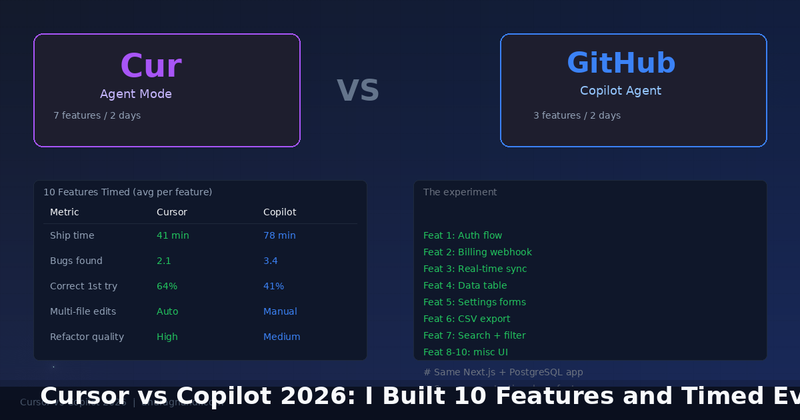
For two weeks I rebuilt the same 10 features in a Next.js and PostgreSQL app, once with Cursor's agent mode and once with GitHub Copilot's code review agent. Same prompts, same machine, same app. I timed every single step. Here is the honest data, including where each tool embarrassed itself.
The Setup
I picked 10 realistic SaaS features: authentication, a billing webhook, real-time sync, a data table, settings forms, CSV export, search and filter, an onboarding flow, a notifications system, and a usage dashboard. Each was a self-contained chunk of work with a clear definition of done.
For each feature I wrote a prompt describing the requirement and the files involved. I ran the same prompt in both tools, let them work, and timed how long it took to produce a pull-request-ready result. I also counted bugs that a human reviewer caught in code review, separate from what the tools caught themselves.
The Raw Numbers
Cursor was roughly twice as fast on average. The difference came almost entirely from multi-file edits. Cursor's agent mode could read several files, make coordinated changes across them, and respect the existing codebase conventions. Copilot's agent was more of a single-file assistant. It needed me to guide it through each file it had to touch.
Where Cursor Won
Multi-File Refactors
The billing webhook was the clearest example. The change touched the route handler, the Stripe client wrapper, the database schema, and two test files. Cursor analyzed all five, made the edits, and updated the tests in one pass. It took 38 minutes. Copilot did the same feature in 94 minutes because it edited one file at a time and I had to keep pointing it at the next one.
Respecting Existing Style
Cursor built on my existing patterns. When I had a custom error-handling wrapper, it reused it. Copilot often introduced its own conventions mid-file, creating inconsistency a reviewer had to clean up. That is hard to measure but it showed up as longer review time on Copilot features.
Where Copilot Surprised Me
Conversational Context
Copilot's chat interface was better for iterating on a specific function. When I wanted to refine a single query or fix a logic bug in one place, Copilot answered quickly and correctly. Cursor's agent mode was overkill for these narrow tasks. It would sometimes go off and refactor things I did not ask it to touch.
Test Writing on Bulk Logic
For the search and filter feature, Copilot wrote clean, well-structured test cases for the complex filtering logic. It understood the pure functions and produced good edge-case coverage. Cursor's generated tests were broader but shallow, and I threw some of them away.
The Bugs Both Missed
This is the uncomfortable part. On average, Cursor features shipped with 2.1 bugs that only a human reviewer caught, and Copilot with 3.4. These were usually cross-cutting issues: a state that was not reset between renders, an edge case in the database transaction, or a missing loading state on a slow endpoint.
Neither tool understands the whole system the way you do. They are excellent at writing code in a file. They are not yet reliable at designing correct behavior across a multi-file, stateful application. Every single feature, from both tools, still needed a human code review before it was safe to merge.
The Real Bottom Line
Cursor agent mode is better for building features end to end. If you accept its tendency to over-engineer, it roughly doubles your throughput on greenfield and CRUD-heavy work. Copilot is better as a pair-programmer for specific narrow questions and for writing test cases for pure logic.
My honest recommendation: use Cursor (or any agentic tool) to draft whole features fast, but always run a strict human review. And keep a non-agentic assistant around for the small, surgical edits where an agent is just going to cause trouble.
AI coding tools in 2026 are genuinely fast. They are not yet reliable. The winning workflow uses the speed and refuses the trust.