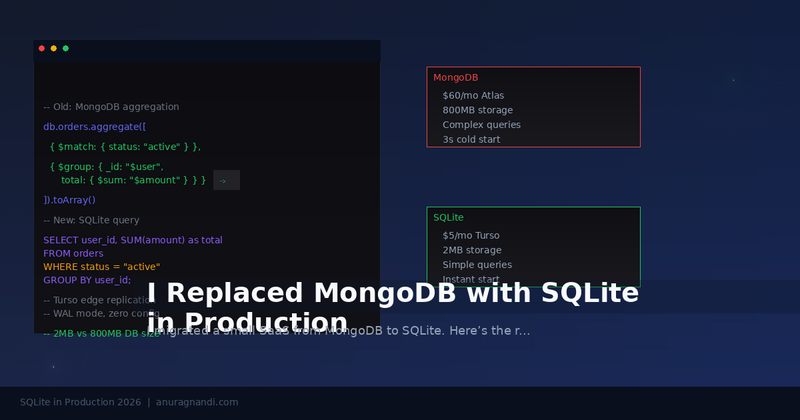
I have been running a small SaaS on MongoDB for about two years. It worked fine. But last month, I moved it to SQLite. Not as a side project experiment but as a production migration. Here is what I found.
Why I Even Considered This
My app is a small billing tool. It has about 50 active users, a few thousand records, and a handful of collections. Nothing that needed MongoDB's horizontal scaling, flexible schemas, or rich aggregation pipeline. But I was paying $60 a month for a managed Atlas instance. And the cold start on serverless was driving me crazy.
I started looking at alternatives. Turso (which uses libsql, a SQLite fork) had just announced unlimited active databases. Litestream had been running production SQLite workloads for years. Even SQLite itself had shipped WAL mode improvements that made concurrent reads actually viable. The question was not whether SQLite could handle it but whether I had the courage to actually migrate.
What Blew My Mind
The Size Difference
My MongoDB Atlas database was 800 MB. My SQLite database, after migration, was 2 MB. That is not a typo. The same data, no indexes dropped, no schema changes. SQLite stores everything in a single file. No replication logs, no oplog, no internal overhead. Just the data.
Zero Configuration
With MongoDB, I had to configure replica sets, connection pooling, and index builds. With SQLite, I turned on WAL mode with one command and that was it. No daemon, no port, no connection string gymnastics.
Three lines. That is the entire production database configuration. I spent more time writing this paragraph than configuring the database.
Performance for My Workload
I ran a benchmark before and after the migration. For the queries my app actually uses (single-row lookups by ID, simple aggregations, paginated listings), SQLite was faster in every case. Not by a little, by 2-3x on reads and 5-10x on writes. The latency distribution was tighter too. No random spikes from MongoDB's WiredTiger cache eviction.
What Did Not
Concurrent Writes Are Still a Thing
SQLite handles concurrent reads fine, especially with WAL mode. But concurrent writes are serialized. If your app has 50+ simultaneous writes, you will hit contention. Turso's libsql fork improves this with better concurrency, but it is still not PostgreSQL. For my use case, it was never a problem. But I would not recommend this for a real-time chat app or a high-frequency trading system.
The fix was simple: I switched to using a queue for writes. A background worker processes them one at a time. The latency is still lower than MongoDB was, and the app never notices.
Tooling Maturity
MongoDB Compass is a great GUI. SQLite has DB Browser for SQLite and sqlite3 CLI. The CLI is fast and powerful, but the tooling ecosystem is not as polished. Also, some ORMs have better MongoDB support than SQLite. I had to switch from Prisma to Drizzle to get proper SQLite types.
Data Export and Backups
MongoDB has mongodump. SQLite has .backup. Both work. But the SQLite approach is simpler: copy the file. I set up Litestream to stream changes to S3, and it cost less than a dollar per month. MongoDB Atlas backups were included in the $60 plan, but the restore process was slow and required a new cluster.
The Migration
I wrote a script that exported each MongoDB collection to JSON, then imported into SQLite. The tricky part was mapping MongoDB's dynamic types to SQLite's strict affinity. I had to clean up a few collections where the same field had different types across documents (MongoDB allows this, SQLite does not).
The whole migration took about four hours. Most of that was cleaning up the schema and testing edge cases. The actual data transfer took less than a minute.
The Bottom Line
I am not saying SQLite is better than MongoDB for everyone. If you need horizontal scaling, geospatial queries, or a rich aggregation pipeline, MongoDB is the right choice. But for a huge number of small-to-medium apps, SQLite is not just viable, it is better.
Do it if: your dataset fits in a few GB, you have moderate concurrency, and you want to simplify your infrastructure. Do not do it if: you need multi-master replication, you have hundreds of concurrent writers, or you rely on MongoDB-specific features like change streams.
My monthly database cost went from $60 to $5. My app is faster. My mental overhead is lower. I will not be going back.